The APEEE has revised its Terms & Conditions. We highly recommend that you carefully read the Terms & Conditions which are available here : General Terms and Conditions.
General
Use of school buses is strictly reserved for students of the European School of Woluwe-Evere.
Before your child can use the Transport Service, you must register them through your APEEE Secured Zone account.
 Register your child for the Transport Service via your APEEE Secured Zone, if you have not already done so.
If your child is already registered for transport, verify that all registration details remain correct (bus stop, departure times, authorised persons, emergency contacts, invoicing details, etc.).
Download the Together School mobile application and activate your parent account before the first day of school. The app will allow you to receive transport notifications, track your child’s bus in real time via GPS, and report your child’s absence when necessary.
Please note: your child will only be able to use the Transport Service once their registration has been confirmed and all necessary arrangements have been completed.
In order to obtain a login and password allowing you to enter your Secured Zone to register your children for the school bus and for extracurricular activities, you need to create an account. A detailed step-by-step guide is available here.
If your child lives alternately with each parent:
Additional regular stops (X1 / X2) (for example a grandparent’s home or a weekly sports activity) are subject to availability and are generally processed from October/November onwards.
Parents already in possession of an APEEE Secured Zone account can register their children via their account using the login and password in their possession.
If you have forgotten them, please click on Forgot your password?
Transport subscriptions are automatically renewed each school year. The following information will automatically be carried over:
Automatic renewal does not apply to:
Bus schedules will be available before the beginning of the school year.
Step 1 – Log in to your account
Access your Secured Zone and log in using your credentials.
Step 2 – Open your child’s bus subscription
In your parent portal, click on your child’s name. If you do not have a bus subscription yet, click on “add a bus subscription”.
A floating window will appear and request additional information. You will be asked who is paying the subscription fee, if you need more information, do not hesitate to visit our dedicated page.
Step 3 – Add your Evere to Woluwe bus ride
Click on “add a bus ride” in the upper left-hand corner.
Please note this service is only available for the afternoon departure at 15:30 and Wednesday departure at 13:00.
Step 4 – Select the correct shuttle service
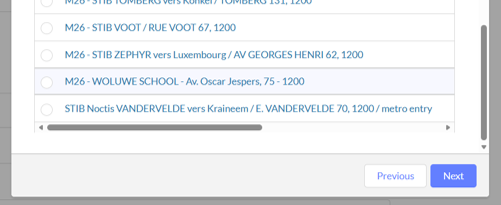
A floating window will open with multiple stops, scroll down to select the “M26 – WOLUWE SCHOOL – Av. Oscar Jespers, 75 – 1200” and click on Next.
Step 5 – Confirm the change
Once the update has been completed, verify that Evere to Woluwe Shuttle – 3:30 pm appears in your child’s bus subscription details.
If you experience any difficulties, please contact the Transport Team for assistance by email at eve-transport@evereparents.org.
Permanent changes include, for example:
These requests must be submitted via your Secured Zone, at least one month in advance.
Because of the overcrowding and the increasingly limited number of spare seats in buses, we may not always be able to accept requests for occasional changes of bus (e.g. to visit another pupil, the doctor, a private teacher, or a sports club).
No occasional or temporary change of bus will be accepted.
Requests must be sent by email to the Transport Office before 13:00 on the previous working day. Approval depends entirely on seat availability.
Requests for an additional regular bus stop (for example, another family member’s home or a weekly activity) will only be considered from November onwards, subject to available capacity.
Please note:
This does not apply to children in shared custody (L1/L2).
As transport subscriptions are automatically renewed, parents wishing to cancel their child’s subscription for the following school year must submit their request:
Before the deadline communicated by the APEEE (end of June).
Cancellation requests must be submitted through your Secured Zone. Cancellations for reasons other than moving house or a pupil leaving school will only occur at the beginning of the following term.
When registering, parents of nursery and primary pupils must indicate whether their child(ren) is authorised to:
Parents may update this authorisation through their Secured Zone whenever necessary.
Please note: Secondary pupils who have not been authorised to leave the bus alone are not allowed to use the buses that leave the school at 16:20.